
What is Wrapped Party? New Spotify feature allows you to compare your 2025 listening data with friends

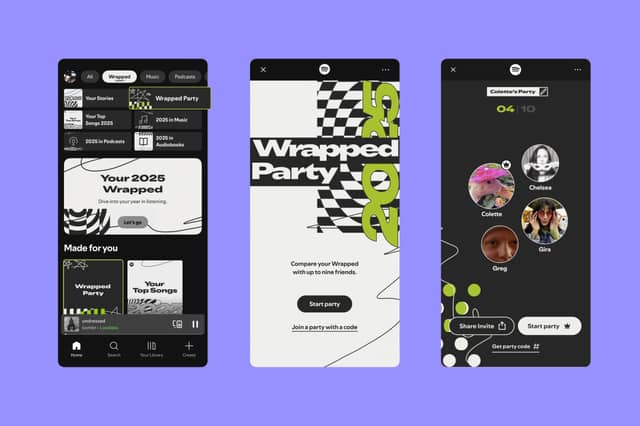

If you enjoy sharing your Spotify Wrapped with friends, then this new feature for Wrapped 2025 could be for you.
If you’ve already received your 2025 Wrapped and have been comparing with friends, then it may be worth investigating Spotify’s newest feature.
Wrapped Party, the platforms first interactive experience, allows you and nine friends to turn your listening data into a live competition.
A move away from last year’s AI generated podcast format, which was unpopular among many users, Spotify are once again focusing on unique personalisation experiences.
This will include the rarest listen between the group, the “most obsessed” fan and those who listened to the most minutes. In addition, you can also see which of your friends you are the most - or least - compatible with, and earn unique awards such as “The Onion Chopper Award” or “The Eternal Optimist Award”.
Here’s how Wrapped Party works and how to get involved.
What is a Wrapped Party on Spotify?
As long as you are 13 or over - and you have listened to more than 30 songs - you can participate in a Wrapped Party.

It works by one person, the host, sending their friends a link and setting up the experience. From there it’s a case of joining the Wrapped Party live. Each party will pull unique awards for your listening habits, which means that even if you repeat the experience with the same friends, no two parties are the same.
You can then share the results among yourselves, though once you leave you will no longer be able to access that specific event.
How to take part in a Spotify Wrapped Party
Are you hoping to host a Wrapped Party or join in with some friends? Here’s how you can both set up and join one.
Starting a Wrapped Party as a host
- Set up your own Wrapped Party by visiting the Spotify Wrapped hub on the app, as this is a mobile-only experience.
- You can then update your profile to see how it appears during the Wrapped Party
- Then invite your friends. To do this, just hit share to generate your unique party code.
- Once you’ve shared the link, make sure to highlight that you need to join the experience live - otherwise you will miss out on the fun.
- As the host, you can decide when the event will kick off and keep things moving.
- You can customise how the experience works with emoji reactions, and even hand off hosting duties if you would prefer.
Joining a Wrapped Party as a guest
- If you’re a guest then you will have an easier time of it, as all you need to do is click on the link. This will automatically open Spotify and let you join the Wrapped Party. If there are any issues, you can also join using the unique code.
- Once you hit “Join Party”, that’s you pretty much ready to go. All you need to do, if you would like to, is update your profile.
- When your profile is up to date, you can join the waiting room and get ready for everyone to join in.
Comments
Want to join the conversation? Please or to comment on this article.